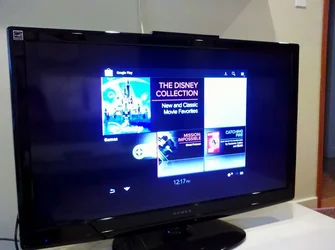
HDMI output is not full-screen on TV

lesterF

Senior Member
Joined
Mar 9, 2012
Messages
14
Reaction score
0
I have the Honeycomb update, and noticed that when I plug my tablet into my 1080p TV using the HDMI output, the image of the tablet's screen does not fill the screen of my TV (see attached). Instead, it's smaller and there is a substantial black border around it. My TV will allow me to re-size/zoom the screen, but only when the signal is below 1080i. So, it seems like the signal from the VTAB is 1080i/p. Does any one else have the same issue?
Thanks!
 

Attachments

  • $HDMI.webp
    $HDMI.webp
    39.6 KB · Views: 2,966
i think, you need to adjust the resolution of the movie to fit your hdtv resolution
 
I think the problem is the Vizio is 4x3 format and the TV is 16x9. Mine has the same issue. Don't know that there will be a solution.

Brad
 
not sure why, but i had the same problem. the solution seems to be: turn on the tv, switch to the correct input, plug the hdmi cord into the vtab, then turn on the tab last. stumbled across this over the weekend and it seems to work consistently. go figure... :rolleyes:
 
Cool...

Did you need to turn on the VTAB from a cold start or just turn it on while it's already booted?

Brad
 
a hard boot didn't appear necessary. just make turning on the VTAB the last thing you do...
 
Thanks for the advice. Unfortunately, it didn't work for me. I hooked up my camera (which has HDMI output) and it displayed full-screen with no problems. Seems like something's up with my Vtab.
 
Back
Top