C Compu_Guy Member Joined Nov 26, 2011 Messages 58 Reaction score 19 Dec 2, 2011 #16 Good idea! So, I ran Quadrant standard with my wife's before. It was: 325, 317, & 318. Running after it is at: 331, 313, 315. Not really any improvement. Looks like it will mostly be the battery that is improved.
Good idea! So, I ran Quadrant standard with my wife's before. It was: 325, 317, & 318. Running after it is at: 331, 313, 315. Not really any improvement. Looks like it will mostly be the battery that is improved.
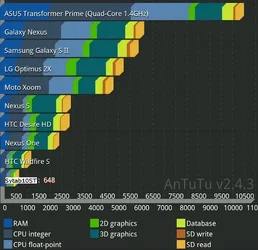
J jatke Member Joined Nov 26, 2011 Messages 17 Reaction score 3 Dec 2, 2011 #17 Yup, several other benchmark apps (Linpack & Antutu) also showed only notional increases at best. 10ST be runnin wit da big dawgs...not
Yup, several other benchmark apps (Linpack & Antutu) also showed only notional increases at best. 10ST be runnin wit da big dawgs...not
cfrockit Senior Member Joined Dec 26, 2010 Messages 627 Reaction score 191 Dec 2, 2011 #18 The scores are better than we had originally with 2.1 on these devices but in line with what we observed once updated to 2.2. http://www.androidtablets.net/forum/sylvania-tablets/8061-quadrant-results-sylvania-synet7lp.html
The scores are better than we had originally with 2.1 on these devices but in line with what we observed once updated to 2.2. http://www.androidtablets.net/forum/sylvania-tablets/8061-quadrant-results-sylvania-synet7lp.html
J jatke Member Joined Nov 26, 2011 Messages 17 Reaction score 3 Dec 3, 2011 #19 Compu_Guy said: ...It took me a minute to finally get to the Battery Usage screen... Click to expand... The only way I found it was to create a shortcut with a long press on home screen > Shortcuts > Settings > Battery Use.
Compu_Guy said: ...It took me a minute to finally get to the Battery Usage screen... Click to expand... The only way I found it was to create a shortcut with a long press on home screen > Shortcuts > Settings > Battery Use.