[Solved] Coby Kyros 9740 Stuck on CWM

Status
Not open for further replies.
so your cache is now mounted via sdcard

 
my cache is now mounting then i try this

Ok download 9740_update_signed.zip place on your sdcard

install 9740_update_signed.zip

in cwm select wipe cache partition

after wipe cache is done

mount and storage

mount /cache

now install 9740_secure_recovery_signed.zip

then reboot system now

but i still back on cwm.
 
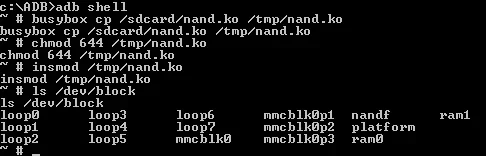
load the nand.ko and post the output of ls /dev/block

the point of the nand.ko is to show the locked or hidden nands.
 
load the nand.ko and post the output of ls /dev/block

the point of the nand.ko is to show the locked or hidden nands.

like this? am i doing it right?

Code:
~ # busybox cp /sdcard/nand.ko /tmp/nand.kobusybox cp /sdcard/nand.ko /tmp/nand.ko
~ # chmod 644 /tmp/nand.ko
chmod 644 /tmp/nand.ko
~ # ls /dev/block
ls /dev/block
loop0      loop3      loop6      mmcblk0p1  nandf      ram1
loop1      loop4      loop7      mmcblk0p2  platform
loop2      loop5      mmcblk0    mmcblk0p3  ram0
~ #
 
adb shell

busybox cp /sdcard/nand.ko /tmp/nand.ko

chmod 644 /tmp/nand.ko

insmod /tmp/nand.ko

ls /dev/block
 
adb shell

busybox cp /sdcard/nand.ko /tmp/nand.ko

chmod 644 /tmp/nand.ko

insmod /tmp/nand.ko

ls /dev/block

Code:
~ # ls /dev/blockls /dev/block
loop0      loop3      loop6      mmcblk0p1  nandf      ram1
loop1      loop4      loop7      mmcblk0p2  platform
loop2      loop5      mmcblk0    mmcblk0p3  ram0
~ #
 

Attachments

  • $Screenshot (83).webp
    $Screenshot (83).webp
    13 KB · Views: 435
Last edited:
As you can see your nand is not showing up, unless we can see and write to nand, nothing can be done.

as you can see from my output

Code:
loop0     loop3     loop6     nandb     nande     nandh     nandk     ram0
loop1     loop4     loop7     nandc     nandf     nandi     nandk1    ram1
loop2     loop5     nanda     nandd     nandg     nandj     platform

you can see all the nands


nandg is very important for flashing as that is the recovery partition, it not being seen or locked means the tablet can't flash anything so it's in a endless bootloop.

nandd is /system

nande is /data

nandh is /cache

nandc is boot.img

nanda is bootloader.img
 
"endless bootloop" means no hope for my mid9740?:(
 
hello sir vampirefo, do you know how can i solve this.

Code:
List of devices attached 
????????????    no permissions

i try to use ubuntu 13.04 64bit maybe i can fix my device using this but my problem is ???????????? no permissions.
 
hello sir vampirefo, do you know how can i solve this.

Code:
List of devices attached 
????????????    no permissions

i try to use ubuntu 13.04 64bit maybe i can fix my device using this but my problem is ???????????? no permissions.

I don't use Ubuntu but, the errors means you need android.rules setup


This should help you with your rules.

Ubuntu No devices permission - xda-developers
 
thanks for the reply sir. i thought ubuntu is linux.
 
thanks for the reply sir. i thought ubuntu is linux.
ubuntu is a Linux distro, there are about 300 distros of Linux.

Lets say you used windows 98 and was asked how to fix a problem on windows 7 mostly likely you wouldn't know cause windows 98 and windows 7 are different. Even though both are windows each is different, this holds the same with Linux, except Linux distros or versions are in the hundreds while there are less then 10 windows version currently used.


http://distrowatch.com/

list about 100 distros there are many more than what are shown here.

anyway looking back you have adb already working in windows so why the need to get it working on ubuntu?

follow the link I posted above in another post to get adb working in ubuntu.
 
Last edited:
Status
Not open for further replies.
Back
Top